电脑桌面
添加小米粒文库到电脑桌面
安装后可以在桌面快捷访问

作品集制作流程

作品集制作流程_第1页
1/14
作品集制作流程_第2页
2/14
作品集制作流程_第3页
3/14
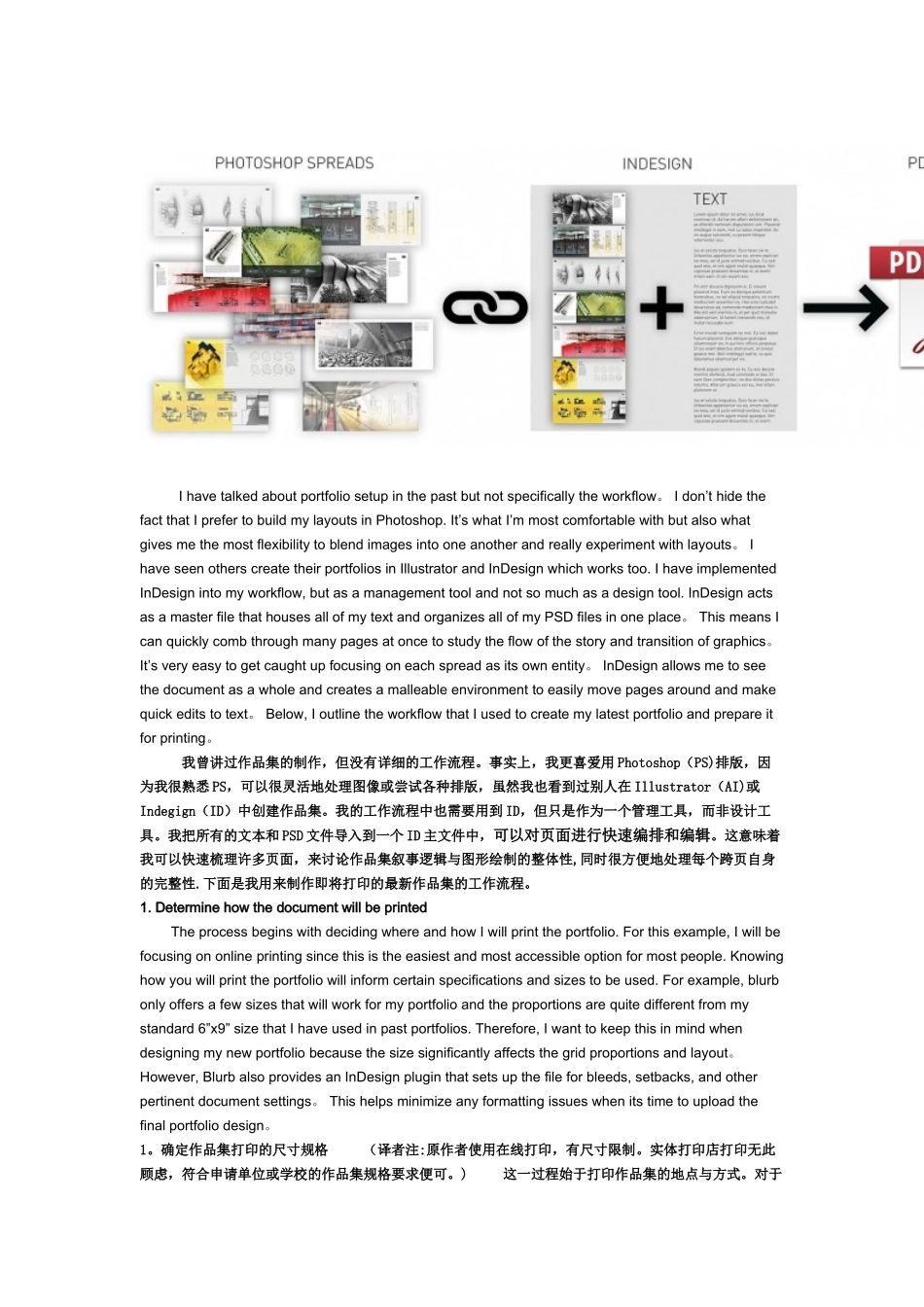
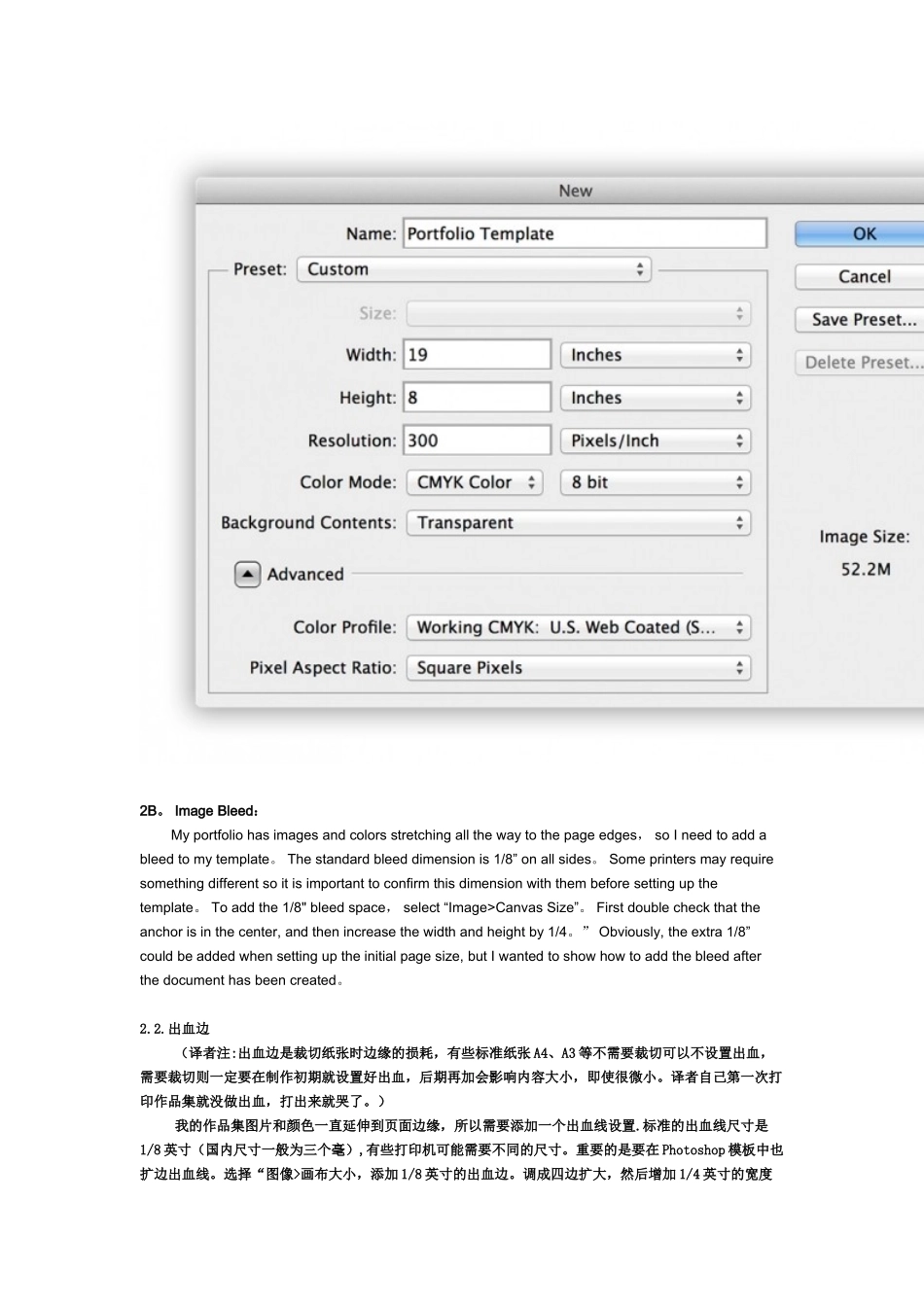
I have talked about portfolio setup in the past but not specifically the workflow。 I don’t hide the fact that I prefer to build my layouts in Photoshop. It’s what I’m most comfortable with but also what gives me the most flexibility to blend images into one another and really experiment with layouts。 I have seen others create their portfolios in Illustrator and InDesign which works too. I have implemented InDesign into my workflow, but as a management tool and not so much as a design tool. InDesign acts as a master file that houses all of my text and organizes all of my PSD files in one place。 This means I can quickly comb through many pages at once to study the flow of the story and transition of graphics。 It’s very easy to get caught up focusing on each spread as its own entity。 InDesign allows me to see the document as a whole and creates a malleable environment to easily move pages around and make quick edits to text。 Below, I outline the workflow that I used to create my latest portfolio and prepare it for printing。 我曾讲过作品集的制作,但没有详细的工作流程。事实上,我更喜爱用 Photoshop(PS)排版,因为我很熟悉 PS,可以很灵活地处理图像或尝试各种排版,虽然我也看到过别人在 Illustrator(AI)或Indegign(ID)中创建作品集。我的工作流程中也需要用到 ID,但只是作为一个管理工具,而非设计工具。我把所有的文本和 PSD 文件导入到一个 ID 主文件中,可以对页面进行快速编排和编辑。这意味着我可以快速梳理许多页面,来讨论作品集叙事逻辑与图形绘制的整体性,同时很方便地处理每个跨页自身的完整性.下面是我用来制作即将打印的最新作品集的工作流程。1. Determine how the document will be printed The process begins with deciding where and how I will print the portfolio. For this example, I will be focusing on online printing since this is the easiest and mo...

1、当您付费下载文档后,您只拥有了使用权限,并不意味着购买了版权,文档只能用于自身使用,不得用于其他商业用途(如 [转卖]进行直接盈利或[编辑后售卖]进行间接盈利)。
2、本站所有内容均由合作方或网友上传,本站不对文档的完整性、权威性及其观点立场正确性做任何保证或承诺!文档内容仅供研究参考,付费前请自行鉴别。
3、如文档内容存在违规,或者侵犯商业秘密、侵犯著作权等,请点击“违规举报”。

碎片内容

作品集制作流程

确认删除?
VIP
微信客服
  • 扫码咨询
会员Q群
  • 会员专属群点击这里加入QQ群
客服邮箱
回到顶部