电脑桌面
添加小米粒文库到电脑桌面
安装后可以在桌面快捷访问

作品集制作流程VIP免费

作品集制作流程_第1页
1/14
作品集制作流程_第2页
2/14
作品集制作流程_第3页
3/14
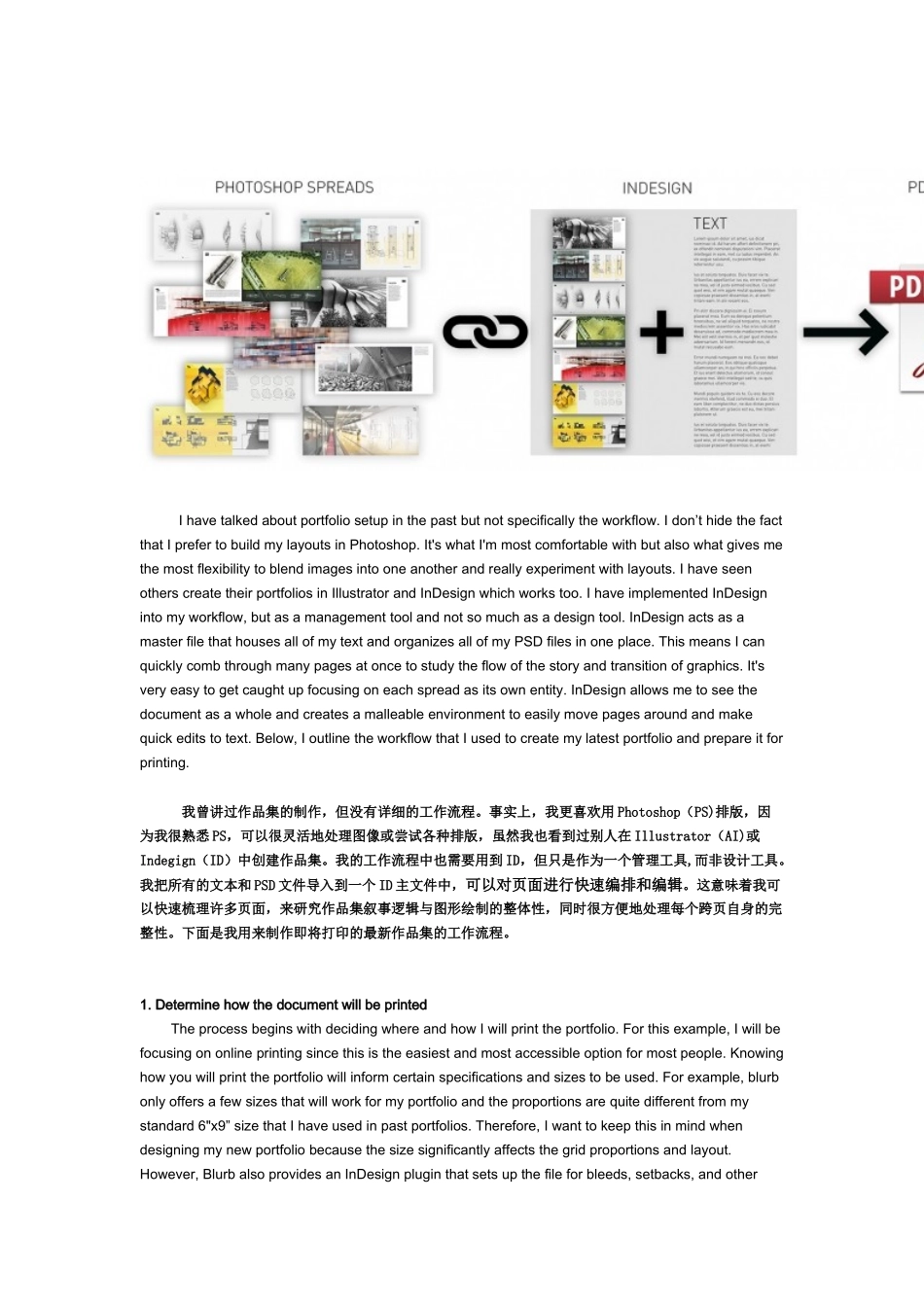
Ihavetalkedaboutportfoliosetupinthepastbutnotspecificallytheworkflow.Idon’thidethefactthatIprefertobuildmylayoutsinPhotoshop.It'swhatI'mmostcomfortablewithbutalsowhatgivesmethemostflexibilitytoblendimagesintooneanotherandreallyexperimentwithlayouts.IhaveseenotherscreatetheirportfoliosinIllustratorandInDesignwhichworkstoo.IhaveimplementedInDesignintomyworkflow,butasamanagementtoolandnotsomuchasadesigntool.InDesignactsasamasterfilethathousesallofmytextandorganizesallofmyPSDfilesinoneplace.ThismeansIcanquicklycombthroughmanypagesatoncetostudytheflowofthestoryandtransitionofgraphics.It'sveryeasytogetcaughtupfocusingoneachspreadasitsownentity.InDesignallowsmetoseethedocumentasawholeandcreatesamalleableenvironmenttoeasilymovepagesaroundandmakequickeditstotext.Below,IoutlinetheworkflowthatIusedtocreatemylatestportfolioandprepareitforprinting.我曾讲过作品集的制作,但没有详细的工作流程。事实上,我更喜欢用Photoshop(PS)排版,因为我很熟悉PS,可以很灵活地处理图像或尝试各种排版,虽然我也看到过别人在Illustrator(AI)或Indegign(ID)中创建作品集。我的工作流程中也需要用到ID,但只是作为一个管理工具,而非设计工具。我把所有的文本和PSD文件导入到一个ID主文件中,可以对页面进行快速编排和编辑。这意味着我可以快速梳理许多页面,来研究作品集叙事逻辑与图形绘制的整体性,同时很方便地处理每个跨页自身的完整性。下面是我用来制作即将打印的最新作品集的工作流程。1.DeterminehowthedocumentwillbeprintedTheprocessbeginswithdecidingwhereandhowIwillprinttheportfolio.Forthisexample,Iwillbefocusingononlineprintingsincethisistheeasiestandmostaccessibleoptionformostpeople.Knowinghowyouwillprinttheportfoliowillinformcertainspecificationsandsizestobeused.Forexample,blurbonlyoffersafewsizesthatwillworkformyportfolioandtheproportionsarequitedifferentfrommystandard6"x9”sizethatIhaveusedinpastportfolios.Therefore,Iwanttokeepthisinmindwhendesigningmynewportfoliobecausethesizesignificantlyaffectsthegridproportionsandlayout.However,BlurbalsoprovidesanInDesignpluginthatsetsupthefileforbleeds,setbacks,andotherpertinentdocumentsettings.Thishelpsminimizeanyformattingissueswhenitstimetouploadthefinalportfoliodesign.1.确定作品集打印的尺寸规格(译者注:原作者使用在线打印,有尺寸限制。实体打印店打印无此顾虑,符合申请单位或学校的作品集规格要求便可。)这一过程始于打印作品集的地点与方式。对于我这个作品集,我选择了在线打印,因为对大多数人来说这是最简单和最容易的选择。了解在线打印提供的尺寸要求,才能决定适用的作品集规格。例如,blurb(在线打印商)只提供了几种打印尺寸,并不符合我以往制作作品集的6英寸乘9英寸标准大小与比例。因此,这次我就记住了使用他们提供的打印规格,因为页面大小将显著影响作品集的网格比例和排版布局。blurb还提供了一个ID插件,设置文件出血、留白和其他相关文件的设置,这有助于简化化作品集的各种打印格式调整。2.PhotoshopTemplateOnceIdeterminewheretheprintingwillbedone,InextsetupaPhotoshoptemplate.ThistemplateismeanttomirrortheInDesigndocumenttemplateexactly.Therefore,Iwillbeusingtheexactsamebleedsettingsandsetbackguides.BelowishowIsetthingsupinPhotoshop:2.制作Photoshop模板一旦我确定作品集的打印规格,我下一步就会建立一个Photoshop模板。这个模板需要与ID设置的打印规格相符合,因此需要设置同样的出血设置和留白设置。下面是我如何在Photoshop中进行设置:2A.InitialPageSize:Theindividualpagesizewillbe8”tallby9.5”wide.Thisisthefinalcutsizegiventomebytheonlineprintingcompany.Thismeanswhenyouopentheportfolioandlookatthespreads,theywillbe8”talland1...

1、当您付费下载文档后,您只拥有了使用权限,并不意味着购买了版权,文档只能用于自身使用,不得用于其他商业用途(如 [转卖]进行直接盈利或[编辑后售卖]进行间接盈利)。
2、本站所有内容均由合作方或网友上传,本站不对文档的完整性、权威性及其观点立场正确性做任何保证或承诺!文档内容仅供研究参考,付费前请自行鉴别。
3、如文档内容存在违规,或者侵犯商业秘密、侵犯著作权等,请点击“违规举报”。

碎片内容

作品集制作流程

确认删除?
VIP
微信客服
  • 扫码咨询
会员Q群
  • 会员专属群点击这里加入QQ群
客服邮箱
回到顶部