WebSphere安装手册1
安装IBMInstallationManager需要安装IBMInstallationManager的服务器为tims1、tims2、tims3、tims4
安装以root用户登录
(1)将安装包agent
installer
x86_64_1
20130301_2248
zip复制或上传到/WAS目录下
(2)进入WAS目录,解压IBMInstallationManager的安装包
[root@tims1~]#cd/WAS[root@tims1WAS]#unzipagent
installer
x86_64_1
20130301_2248
zip-dinstaller(3)安装
[root@tims1WAS]#cdinstaller[root@tims1installer]#
/install这时候,将会出现安装的图形界面
点击Next
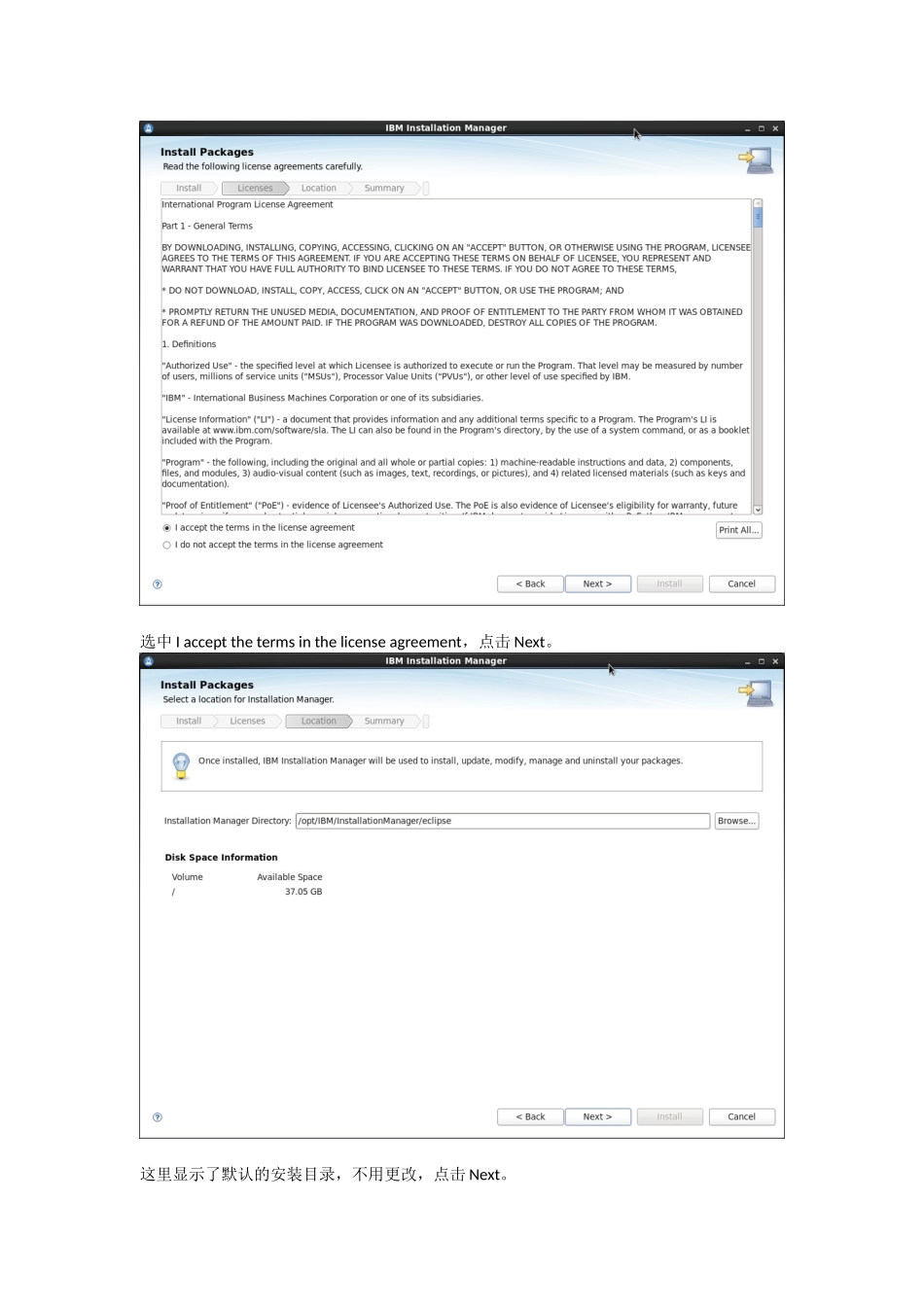
选中Iacceptthetermsinthelicenseagreement,点击Next
这里显示了默认的安装目录,不用更改,点击Next
确认信息无误后,点击Install
等待一会,安装完成后将显示如下界面
点击RestartInstallationManager,重启InstallationManager
启动[root@tims1~]#cd/opt/IBM/InstallationManager/eclipse[root@tims1eclipse]#
/IBMIM这时候,将出现IBMInstallationManager的图形界面
停止在图形界面上直接关闭窗口即可
安装IBMHTTPServer需要安装IBMHTTPServer的服务器为tims1
需要先安装好IBMInstallationManager